

The Download Barrier Is Dead: How App Clips Turn “Maybe Later” Into “Right Now”
February 5, 2026
Apple’s App Clips deliver native app experiences instantly without requiring downloads. Here’s how this changes everything for retail.
The friction problem:
You’ve invested in a native mobile app. You’ve optimized the experience. You’ve proven that app users convert 41% higher than mobile web. There’s just one problem: getting customers to download it in the first place.
When they’re standing in your store, the average person downloads zero apps per month. Asking them to “download our app” is a non-starter when they are looking at a product, or walking past your storefront in a mall, unless you give them a compelling reason to do so.
What Are App Clips?
App Clips are lightweight, instant-access versions of your iOS native app that launch in seconds without requiring an App Store download.
Think of them as the perfect first date with your app. Customers get the native performance and Apple Pay convenience they expect, without the commitment of downloading a full app.
The technical details:
- Maximum 15MB for instant loading (iOS 16 and earlier)
- Launch via QR codes, NFC tags, Safari banners, or social ads
- Native Swift/UIKit experience with Apple Pay integration
- 8-hour push notification window after each launch
- Seamless prompt to download full app afterward
App clips will remain usable on the device as an ‘app’ in the App Library for 30 days after last use, then it will be auto-deleted.
The strategic reality: App Clips eliminate the single biggest barrier between interested customers and app adoption.
Why This Matters: The Omnichannel Opportunity
The power of App Clips isn’t just technical. It’s strategic. They bridge the gap between offline and online in ways that were previously impossible.
In-Store: Turn Browsers Into App Users
The scenario: A customer is standing in your store, looking at a product. They pull out their phone to check reviews, compare prices, or see if it’s available in other colors.
Without App Clips: They go to your mobile web. The experience is okay. They may or may not buy. You have no ongoing relationship.
With App Clips: They scan a QR code on the product display or shelf tag. Instantly, they’re in a native app experience seeing reviews, checking inventory, adding to bag, and checking out with Apple Pay. The transaction is complete in seconds. Then iOS prompts them to download the full app.
The result: Frictionless commerce that converts browsers into app users without asking them to “download our app” while they’re mid-shopping.
Print & OOH: Make Every Ad Actionable
Magazine ads, direct mail, billboards, transit advertising. Traditionally, these drive awareness but create friction at conversion.
With App Clips activated via QR codes or NFC tags:
- Fashion brand billboard → Scan → Shop the look → Buy with Apple Pay
- Direct mail catalog → Tap phone to page → Instant access to featured products
- In-store poster → Scan → Enter contest → Instant loyalty sign-up
The value: Every offline touchpoint becomes a frictionless path to conversion.
Real Use Cases: How Retailers Deploy App Clips
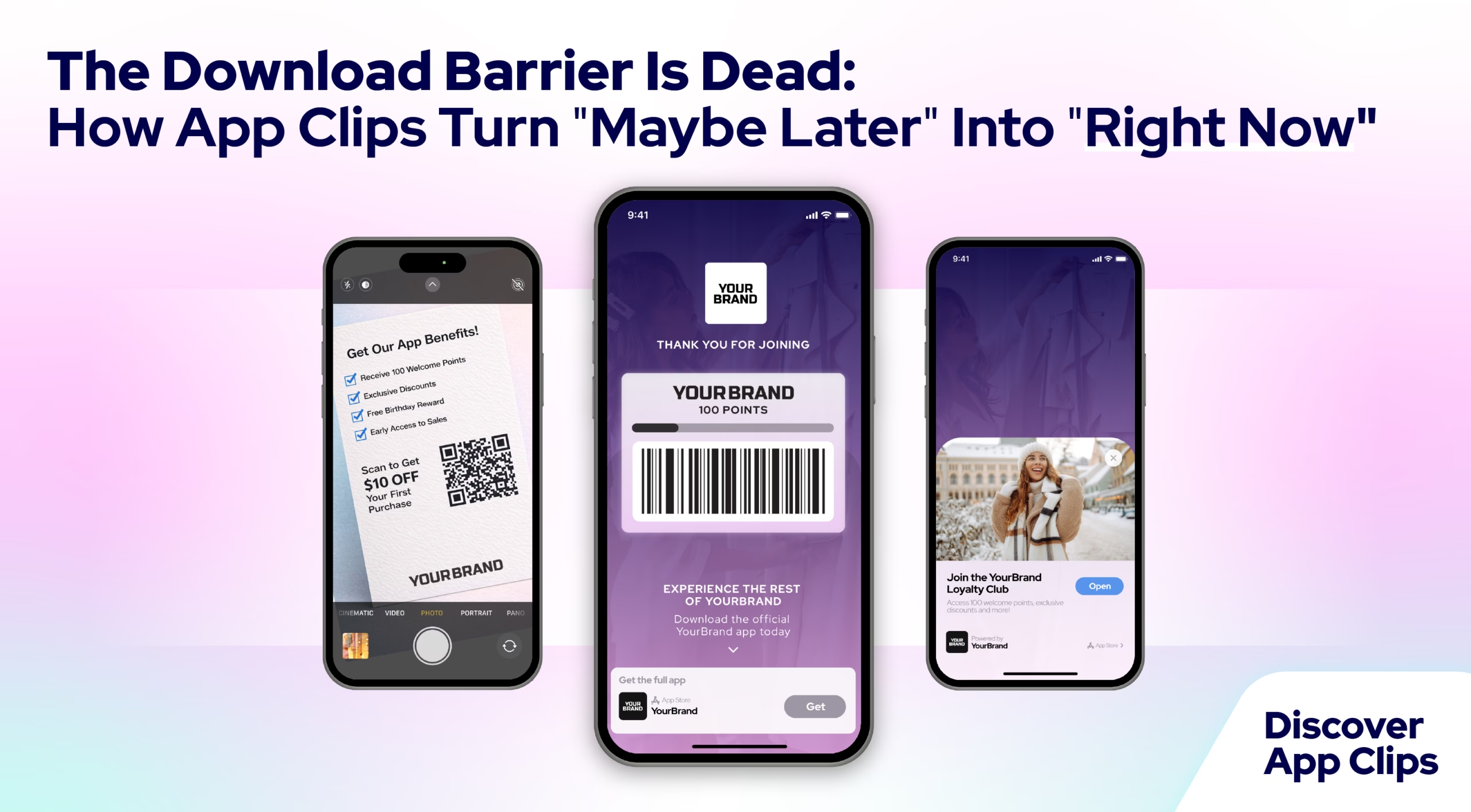
1. Loyalty Sign-Up
The challenge: Getting customers to sign up for loyalty programs in-store is clunky. Long forms, email entry, waiting for confirmation.
The App Clip solution:
- Customer scans QR code at checkout or on in-store signage
- App Clip loads instantly
- Customer signs up
- Instantly receives digital loyalty card with scannable barcode
- Starts earning rewards immediately
- Gets prompted to download full app for ongoing engagement
Why it works: Zero friction loyalty acquisition with immediate value.
2. Single Item Purchase
The scenario: Customer sees a product in-store but wants a different size or color not currently in stock.
The App Clip solution:
- Scan product tag or shelf QR code
- App Clip loads showing that specific product
- Select size/color
- Check out with Apple Pay
- Ship to home or reserve for pickup
The benefit: Capture sales that would otherwise be lost to “we don’t have your size.”
3. Dynamic Content Landing Page
The power move: App Clips can leverage Dynamic Content (from poq’s AW25 release) to create fully customizable experiences.
Use cases:
- Contest entries
- Limited-edition product drops
- Seasonal campaign microsites
- Video content with shoppable products
- Quiz-based product recommendations
- VIP early access sign-ups
The advantage: Marketers can build sophisticated, interactive experiences without developer resources. Then activate them via QR codes anywhere.
The Economics: Why App Clips Drive ROI
Let’s talk about what this actually means for your business.
Higher Conversion Than Mobile Web
App Clips deliver native app performance, which means they convert better than mobile web experiences. You’re giving customers the superior experience without asking for the download commitment upfront.
Lower Acquisition Costs
Traditional app acquisition:
- Paid UA campaigns: $3-$15+ per install
- App Store optimization: Slow, competitive
- Retargeting: Expensive, inconsistent
App Clips acquisition:
- In-store QR codes: approximately $0 marginal cost per use
- Print/OOH activation: Leverages existing marketing spend
- Geofencing: Targets customers already nearby
The difference: You’re acquiring app users through channels you already own or rent, rather than paying platforms for every install.
Smoother Path to Full App Adoption
The “try before you download” model removes psychological friction. Customers who use App Clips and see value are significantly more likely to download the full app than customers who encounter a “download our app” prompt cold.
The funnel:
- Customer uses App Clip for specific task
- Sees immediate value (fast, easy, Apple Pay)
- Gets iOS prompt to download full app
- Converts to full app user with context of positive experience
Versus the traditional approach:
- “Download our app!”
- Customer ignores or downloads and never opens
- No relationship established
When to Deploy App Clips
App Clips make sense when you want to:
✅ Drive in-store engagement without asking customers to download while shopping
✅ Activate print and OOH campaigns with instant, actionable experiences
✅ Reduce loyalty sign-up friction and increase program adoption
✅ Capture lost sales when products aren’t available in-store
✅ Bridge offline to online seamlessly across all touchpoints
✅ Acquire app users through owned channels rather than paid acquisition
✅ Test app-driven campaigns before investing in full app marketing
When App Clips don’t make sense:
- If you don’t have physical stores, print, or location-based use cases
- If your app doesn’t have clear, task-specific functions that benefit from instant access
Getting Started
If you’re a poq customer, App Clips capability is built into your platform. The question isn’t technical. It’s strategic: What friction points in your customer journey would disappear if you removed the download barrier?
Start with one high-value use case:
- In-store loyalty sign-up
- Print campaign activation
- Product-specific shopping from in-store displays
- Location-based store visit drivers
Deploy, measure, learn, expand.
Ready to deploy App Clips? Talk to your poq team about identifying high-value use cases and getting started.